Price Sync Troubleshooting
Understand CardBndr's Smart Sync Architecture — API connection stability detection, the 60-second cooldown, automatic retries, and how to diagnose failed chunks.
Prices not updating the way you expect? Seeing a cooldown timer? Finding cards that never got a price? This page explains exactly what’s happening under the hood and what you can do about it.
Smart Sync Architecture
Smart Sync — Rate-Limit Protection: CardBndr’s price engine is designed to survive external API instability without losing any work.
How it works:
- Prices are fetched in batches of 75 cards at a time.
- A mandatory 100 ms gap is inserted between every request to stay within the data provider’s fair-use policy.
- If 3 consecutive chunks all return
HTTP 503(Service Unavailable), CardBndr recognises this as a connection instability cluster — not a transient network blip — and triggers a deliberate 60-second pause.- After the cooldown, the sync resumes exactly where it left off. No cards are skipped. Nothing is lost.
- Any chunks that still failed after the main pass are collected into a retry queue and re-sent automatically once the pass completes.
This whole flow is what we call Smart Sync.
The footer bar at the bottom of the app mirrors the sync status in real time — you don’t need to keep the Settings window open to track progress:

Price sync via Card Database: rate limited — pausing 60s (chunk 42/180, ~4m 30s left after resume)…What you should do: Nothing. Just wait. The ETA shown already accounts for the resumption time. If you’re in a hurry, click Cancel — CardBndr will finish the current batch cleanly and stop, keeping any prices already updated in this run.
”Why did the sync pause and show a cooldown message?”

The card database API enforces a rate limit — if too many requests arrive in quick succession, it starts returning HTTP 503 errors. Even with the 100 ms inter-request delay, a large sync (thousands of cards) can occasionally trigger a burst of 503s.
When CardBndr detects 3 consecutive failed chunks, it takes a deliberate pause:
Price sync via Card Database: rate limited — pausing 60s (chunk 42/180, ~4m 30s left after resume)…
The 60-second pause is long enough for the external API’s rolling rate-limit window to fully reset. Once it’s up, CardBndr resumes exactly where it left off.
”Why do some cards still show no price after a sync?”
There are a few reasons a card can come out of a price sync without a price.
1. The API returned an error for that chunk and the retry also failed
If a batch of 75 cards hits a persistent error that doesn’t resolve even after the cooldown retry, those cards stay unpriced for this run. This is uncommon but can happen if the external data provider is experiencing wider service issues.
2. No market price is available for this card
Some cards don’t have market data available: very old sets with no active secondary market, digital-only cards, art series, tokens, and similar. These will always show ”—” in the price column.
3. The wrong price provider is selected
If you’re using the Secondary Market Live provider for bulk updates, be aware that bulk sync for this provider is intentionally disabled. Bulk-scraping the secondary market can get your IP flagged. With this provider selected, bulk price updates are blocked and a warning is shown. Switch to Primary Card Database in Settings for bulk runs, then fetch individual secondary-market prices card-by-card from the card’s action dialog.
4. A manual price override is active
If you previously saved a manual price for a card, that value takes precedence over any synced price. The price column will show (manual) next to the value. Open the card dialog and click Clear to go back to the live market price.
”How do I find out which specific cards failed?”
Every price sync writes a detailed entry to the History tab — including a full list of any chunk errors that occurred.

-
Go to the History tab and look for the most recent
database_updateevent. The message column will read something like:Price sync done: 2 847 card(s) updated via Card Database API [all cards] (3 chunk error(s) remaining)
-
If there were any errors, the row will have an ⓘ info icon on the right side of the message. Click it to open the detail dialog.
-
The detail dialog shows two sections: the summary message, then a separator labelled “Error / Warning Log” with one line per failed chunk:
Card Database API chunk 42/180: HTTP 503 — Service Unavailable (75 card(s) not priced)
Card Database API retry chunk 1/3: HTTP 503 — Service Unavailable (75 card(s) still not priced)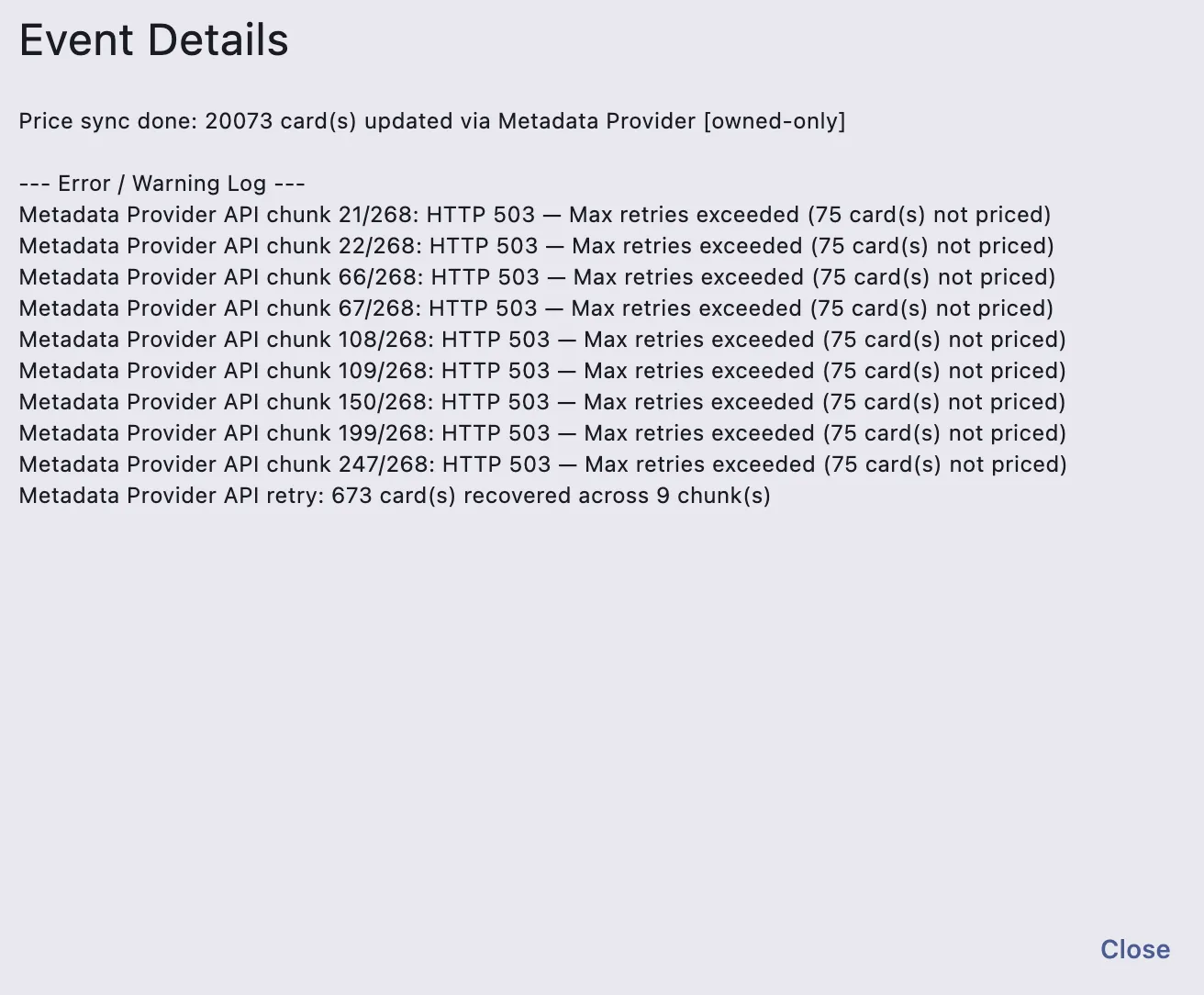
This tells you the chunk number, the exact HTTP status returned, and how many cards were in that batch.
-
If the error log was very large (rare — would need dozens of consecutive failures), it’s capped at 4 KB and ends with
… (truncated). Everything up to that point is still accurate.
”How does the automatic retry work?”
After completing the main sync pass, CardBndr checks whether any chunks failed. If there’s anything in the retry queue, it:
- Calculates how long ago the last cooldown was. If it was less than 60 seconds ago, it waits only the remaining difference (e.g. if the last cooldown ended 45 seconds ago, it waits just 15 more seconds — not a full 60).
- Sends the failed cards again in new chunks of 75.
- Logs the outcome either way — recovered cards are noted positively, and any that still fail get a
retry chunk X/Y: HTTP …line in the error log.
In practice, a burst of 503s during the middle of a sync almost always resolves itself by the end of the run:
Price sync fetch finished: 2 847 cards priced, 225 retried (0 chunk errors remaining)
If the retry count is non-zero but errors remaining is zero — every card that failed in the main pass was successfully recovered.
”The sync is taking a really long time. Is it stuck?”
Not if the footer is still updating. The ETA is calculated from real elapsed processing time, with cooldown/sleep time subtracted, so it gives you a genuine estimate of the work remaining.
If you see the same status message frozen for more than 90 seconds without the ETA updating, a network issue (not a rate limit) may have stalled the request. In that case:
- Click Cancel to gracefully stop the current run.
- Check your internet connection.
- Start a new price sync — cards updated in the previous run keep their prices, so you’re not starting from zero.
Quick Reference
| Symptom | Most Likely Cause | What to Do |
|---|---|---|
| ”Rate limited — pausing 60s” message | API connection instability (3 consecutive 503s) | Wait — Smart Sync auto-resumes and retries |
| Card shows ”—” after sync | No market price data available for this card | Expected for tokens, art series, etc. |
| Card shows “(manual)” price | Manual override is active | Open card dialog → Clear |
| History row has ⓘ icon | Chunk errors occurred | Click ⓘ to see which chunks and HTTP codes |
| Bulk secondary-market sync blocked | Secondary-market bulk disabled by design | Switch to Primary Card Database for bulk; use card dialog for individual market prices |
| Status frozen for 90+ seconds | Possible network stall | Cancel, check connection, retry |